
From the quote to the paid invoice. Without a second program.
Write a quote, issue a progress invoice, settle it in the final invoice, send a reminder. All in Toolyte, all on the customer and the job. As a ZUGFeRD PDF or XRechnung, validated before it goes out.
14-day free trial · no credit card required
- Progress invoice 1
- −€3,600.00
- Progress invoice 2
- −€4,000.00
- Outstanding
- €4,400.00
- Format
- ZUGFeRD PDF
- Net / gross
- €10,084.03 / €12,000.00
- Due
- 17/09/2026
- Checksum
- SHA-256 · 7f3a…c1
The invoice is done. And that's when the work starts.
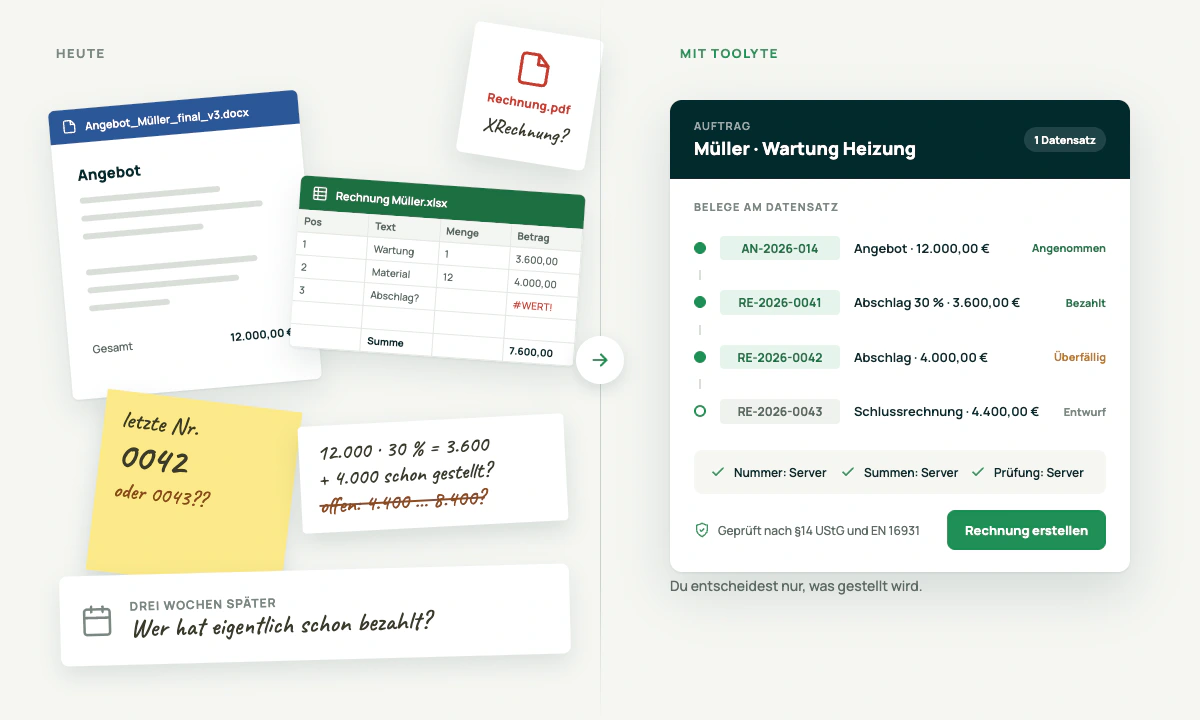
The quote is in Word, the invoice in Excel, the number on a sticky note. For the next progress invoice you work out in your head what has already been billed. The customer wants an XRechnung and you don't know whether your PDF is one. Three weeks later you're wondering who still hasn't paid.
Toolyte attaches every document to the record it came from. The server assigns the number, the server does the maths, the server runs the validation. All you decide is what gets issued.
Four steps, one record
From the quote to the recorded payment, everything stays on one job — no export, no second program, no sticky notes.
- 1
Write the quote
Enter line items or dictate them, discount per item, units as you like. Send the quote, the customer accepts or declines. Both end up in the history.
- 2
Turn it into an invoice
One quote can become any number of invoices: the full invoice, a progress invoice by amount or percentage, a partial invoice with selected line items and partial quantities, and finally the final invoice. That one deducts every progress invoice individually.
- 3
Validate and issue
Before issuing, Toolyte checks the document against §14 UStG and EN 16931. Errors block, notices don't. Only once there are no errors does the “Create invoice” button appear. It assigns the number, locks the document and produces the ZUGFeRD PDF or XRechnung XML.
- 4
Send it, record the payment, done
By email straight from Toolyte or as a download. Enter the payment, deduct the early-payment discount, the outstanding amount drops. If it doesn't arrive, the reminder is ready.
Every document a job needs
Seven document types, each with its own number range, its own status and its own history.
- AN-
Quote
Line items, validity, acceptance or rejection in the history
- RE-
Invoice
Full invoice directly or from the quote
- RE-
Progress invoice
By amount or percentage of the quote
- RE-
Partial invoice
Selected line items, partial quantities included
- RE-
Final invoice
Settles every progress invoice, listed individually
- GS-
Credit note
A document in its own right with positive line items, paid out to the recipient's IBAN
- ST-
Cancellation
Mirrors the invoice in full, the original is marked “Cancelled”
Plus incoming invoices for the documents you receive.
Progress invoices that settle themselves
A quote for €12,000. After the first phase a progress invoice for 30 per cent, after the second one for €4,000. The final invoice lists both progress invoices individually and deducts them. What's left outstanding is worked out by the server. Not by you.
Locked means locked
An issued document can no longer be changed. Number, date, customer and line items are locked — on the server, not just on screen. Anyone who reaches for “Edit” is told why that doesn't work, and shown the way to a cancellation.
New roof truss · accepted on 12/05/2026
- Progress invoice 1 · 30%€3,600.00RE-2026-0031
- Progress invoice 2 · amount€4,000.00RE-2026-0038
- Total
- €12,000.00
- Progress invoice 1
- −€3,600.00
- Progress invoice 2
- −€4,000.00
- Outstanding
- €4,400.00
ZUGFeRD and XRechnung, validated before they go out
You pick the format when you issue. ZUGFeRD is a PDF/A-3 with embedded XML, for everyone who wants a readable invoice. XRechnung 3.0.2 is pure XML for public authorities and large companies that require it. Both formats are validated automatically against KoSIT and Mustang in our delivery pipeline.
ZUGFeRD PDF
- PDF/A-3 with embedded XML per EN 16931
- For everyone who wants a readable invoice
- Validated against KoSIT and Mustang in the delivery pipeline
XRechnung XML
- XRechnung 3.0.2, pure XML
- For public authorities and large companies that require it
- The routing ID (Leitweg-ID) is only needed here
Pre-flight validation
Before you issue, a check runs against §14 UStG and EN 16931. Errors block the button, notices don't. The check is stricter or looser depending on the target format: only the XRechnung needs the routing ID.
Tax regimes
Standard taxation, small-business rule under §19 UStG and reverse charge. The tax rate sits on the article, the totals (net, VAT per rate, gross) are always calculated by the server.
Layout
A fixed invoice layout to DIN 5008 with your logo, your colours and your wording.
- Routing ID missingIt is mandatory for the XRechnung. It sits on the recipient and can be overridden on the document.
- Tax rate missing on line item 3The tax rate sits on the article. Without it the server calculates no totals under §14 UStG.
- No payment term givenA notice, not an error. The document can still be issued.
Two errors left. Only then does the button work.
Line items just like the measurement sheet
The line-item table is a field type of its own with an editor. Units freely chosen, discount per item, item flags for contingency, alternative and optional items.
Measurements
Length times width times count as a formula right in the line item. The quantity works itself out.
Price costing
Purchase price, markups, selling price. The calculated unit price appears on the document, the costing behind it never leaves the server. The customer never sees it, not even in the XML.
Post-costing
A card on the document shows what was planned and what it turned out to be.
| Line item | Qty | Unit | Unit price |
|---|---|---|---|
| Roof battens5% discount | 12.5 × 2.4 × 390.00 | m² | €18.40 |
| Counter battensContingency item | 12.5 × 337.50 | m | €4.90 |
| Roof truss assemblyHourly rate | 8 × 432.00 | hrs | €68.00 |
Post-costing
on document RE-2026-0043- Planned
- €10,084.03
- Actual
- €10,612.50
Who paid, who didn't, who gets a letter
Payments
Every payment is recorded, never overwritten. Corrections are added as entries of their own. Early-payment discount as a “of which discount” field, outstanding amount and payment list on the document.
- 10/06/2026 · bank transfer
- €3,600.00
- 21/07/2026 · bank transfer
- €3,960.00
- of which discount
- €40.00
- Outstanding amount
- €4,400.00
Three reminder levels
Payment reminder, first dunning letter, second dunning letter. Each with its own number (MA-), its own fee, editable wording, PDF and dispatch. The “reminder due” signal appears on the document when the time comes.
- Payment reminderno feeMA-2026-0011
- First dunning letter€5.00 feeMA-2026-0012
- Second dunning letter€10.00 feeMA-2026-0013
Open items
The document list filters by outstanding, overdue and paid. One look and you know where the money stands.
- RE-2026-0043€4,400.00Demo Holzbau GmbHOutstanding
- RE-2026-0039€1,284.50Müller Haustechnik GmbHOverdue
- RE-2026-0038€4,000.00Demo Holzbau GmbHPaid
The document stays on the record. For good.
Dispatch
“Send by email” opens Toolyte's normal email composer, document attached, customer and company addresses pre-filled, a template per document type with placeholders. The mail is linked to every record involved. Afterwards the document reads “Sent on … to …”. It goes out through your own mailbox, not through a Toolyte account: the customer sees your sender address, and the mail sits in your Sent folder.
Filing
Every output is versioned and filed immutably, with a SHA-256 checksum. Issued documents show exactly the file that went out on their detail page. Drafts show a live preview. Full screen and download in one click.
History
Issued, sent, quote accepted, payment recorded, reminder sent. All in the audit trail, with time and person.
History
- Issued · RE-2026-004303/09/2026, 08:41 · Sander
- Sent to buchhaltung@holzbau-demo.de03/09/2026, 08:43 · Sander
- Quote AN-2026-014 accepted12/05/2026, 16:02 · Customer
- Payment recorded · €3,960.0021/07/2026, 09:15 · Office
- Payment reminder MA-2026-001118/09/2026, 07:00 · System
Private, commercial or both
Recipients
During setup Toolyte asks whether you invoice private individuals, companies or both, and creates the matching contact and company schemas or connects existing ones. Every document has two recipient fields. If both are filled, it goes to the company and the contact name sits below it in the address block. The routing ID sits on the recipient and can be overridden on the document.
Number ranges
Gapless, a separate range per document type. You set the pattern and the starting value, an annual reset is optional, and you see the next number live in the preview.
Retrofitting what's there
If you already have customers in Toolyte, you click “Update”. Missing fields, roles and flags are added, nothing is overwritten.
Who do you invoice?
Number range · Invoice
- Pattern
- RE-{YYYY}-{0000}
- Starting value
- 1
- Reset
- annually
What comes in, the AI reads
Upload an invoice, PDF or e-invoice. The AI reads it and fills the empty fields: issuer, number, date, amounts. For an e-invoice a card of its own shows the structured content from the XML.
The AI also looks in your mailbox
If an invoice arrives by mail, the AI spots it in the attachment and suggests recording it as an incoming invoice. You see the suggestion on the mail, check the values it read and accept or decline. Nothing is recorded without your click.
Invoice 4471-2026 · holzgrosshandel-4471.pdf
- Issuer
- Holzgroßhandel Nord KG
- Number
- 4471-2026
- Date
- 28/08/2026
- Net / gross
- €1,037.82 / €1,235.00
Write an invoice to Müller for Tuesday's maintenance
Create invoices by voice, dictate line items, filter lists. Toolyte creates the draft, you check it and issue it. Nothing is ever issued automatically.
Write an invoice to Müller for Tuesday's maintenance
- Recipient
- Müller Haustechnik GmbH
- Service
- Maintenance, 01/09/2026
- Line item 1
- 3.5 hrs · €68.00
- Gross
- €283.22
A draft. The number only comes when you issue.
What the tax office wants is built in
- Issued documents are immutable, enforced on the server. Changes only via cancellation and a new document.
- Gapless number ranges, assigned on issuing, never before.
- Every output versioned, with SHA-256, filed on the record.
- Payments are append-only, corrections are entries of their own.
- An audit trail for every step.
- Permissions per schema: whoever writes quotes is not automatically allowed to issue invoices.
- Help articles for every area right inside the application.
What Toolyte doesn't do
- Euro only. Other currencies are prepared but not active.
- No import of old quotes or invoices from other programs. New documents are created in Toolyte.
- The early-payment discount is entered when you record the payment; Toolyte does not check the deadline automatically.
- Incoming invoices are read and filed, not approved or paid.
- No bookkeeping: no chart of accounts, no DATEV handover.
Invoicing with Toolyte, briefly explained
Yes, as many as you like. Full invoice, progress invoice by amount or percentage, partial invoice with selected line items and partial quantities, and the final invoice at the end. That one settles every progress invoice individually.
Yes. ZUGFeRD is a PDF/A-3 with embedded XML per EN 16931. It meets the requirements for an e-invoice and still stays readable for people. Public authorities usually need XRechnung, which Toolyte produces as well.
The pre-flight validation shows the error before you issue. The “Create invoice” button only appears once there are no errors left. Notices don't block.
No. Issued documents are locked, on the server too. You cancel the invoice, the original is marked “Cancelled”, and you issue a new one.
Yes. The small-business rule under §19 UStG is a tax regime of its own, alongside standard taxation and reverse charge.
By email straight from Toolyte, with pre-filled addresses and a template per document type. Or as a download. The dispatch note then sits on the document.
Three levels: payment reminder, first and second dunning letter. Each with its own number, fee, wording and PDF. Toolyte shows on the document when a reminder is due.
No. “Update” adds missing fields and roles to your existing contacts and companies without overwriting anything.
Yes. You say who it's for and what it's about, Toolyte creates the draft and takes line items by dictation. It is only issued on a click.
Yes. The AI checks the mails in your connected mailbox, spots an invoice in the attachment and suggests recording it as an incoming invoice. Accepting or declining is up to you.
On the record, versioned and immutable, with a SHA-256 checksum. On servers in Germany.
You'll write your next invoice in Toolyte.
Quote, progress invoice, final invoice, reminder. As an e-invoice, validated, on the record.
14 days free, no credit card.
Still comparing? See all features